
Screenshots
App details
- Version
- 1.0
- Size
- 20.27 MB
- Updated
- June 26, 2025
- Requires
- Windows 11
- License
- Free
- Developer
- Free Barcode Software
- Category
- Windows OS
SoftPas in:
This product is also available in the following languages:
About Bulk Wedding Card Creating Software
Download Bulk Wedding Card Creating Software – Free, Secure, Bulk Wedding Card Designer for Windows
Looking for a reliable and efficient way to create wedding cards in bulk? Bulk Wedding Card Creating Software is a free, user-friendly tool developed by Free Barcode Software specifically for Windows users. Designed with simplicity and functionality in mind, this software helps you manage and produce multiple wedding invitations, save-the-dates, and thank-you cards with ease. Whether you're a wedding planner, a small business owner, or preparing for your own wedding, this tool streamlines the design and production process, saving you hours of manual work. With support for customizable templates, image integration, and text personalization, you can create professional-looking wedding cards in minutes. The software is optimized for Windows systems and offers a secure, no-cost solution to handle large-scale card creation tasks. Best of all, it's completely free to download and use—no hidden fees or trial limitations.
Key Features of Bulk Wedding Card Creating Software
Bulk Wedding Card Creating Software stands out in the crowded market of design tools thanks to its specialized focus on wedding card production. One of its most powerful features is bulk card generation. Instead of designing each card individually, users can input a list of names, dates, and other details, and the software automatically generates customized cards for each entry. This is ideal for couples with large guest lists or event planners managing multiple weddings simultaneously.
The software supports multiple image and text formats, allowing you to import high-quality photos, logos, and graphics directly into your designs. You can also apply various fonts, colors, and layout styles to match your wedding theme. With the template creation feature, you can save your preferred design settings—such as background, font, and spacing—for future use. This ensures consistency across all cards, which is essential for branding and professional presentation.
Another standout feature is batch export functionality. Once your cards are designed, you can export them as PDFs, JPGs, or PNGs in a single click. This makes printing, sharing, or sending digital invites effortless. The software also includes a preview mode that lets you see how each card will look before finalizing, reducing errors and rework. For users who need to manage data efficiently, the tool supports CSV and Excel import, enabling seamless integration with existing guest lists or contact databases.
Additionally, the software is lightweight and doesn’t require high-end hardware, making it accessible to users with older or budget-friendly Windows PCs. Its intuitive interface ensures that even those with minimal design experience can create beautiful, personalized wedding cards without a steep learning curve.
How to Install and Use Bulk Wedding Card Creating Software
Installing Bulk Wedding Card Creating Software is quick and hassle-free. First, visit the official download page and click the “Download Free” button. The file is typically a small executable (under 20MB), so it downloads in seconds. Once downloaded, run the installer and follow the on-screen prompts—no complex configurations are needed. The setup process takes less than a minute, and the software launches automatically after installation.
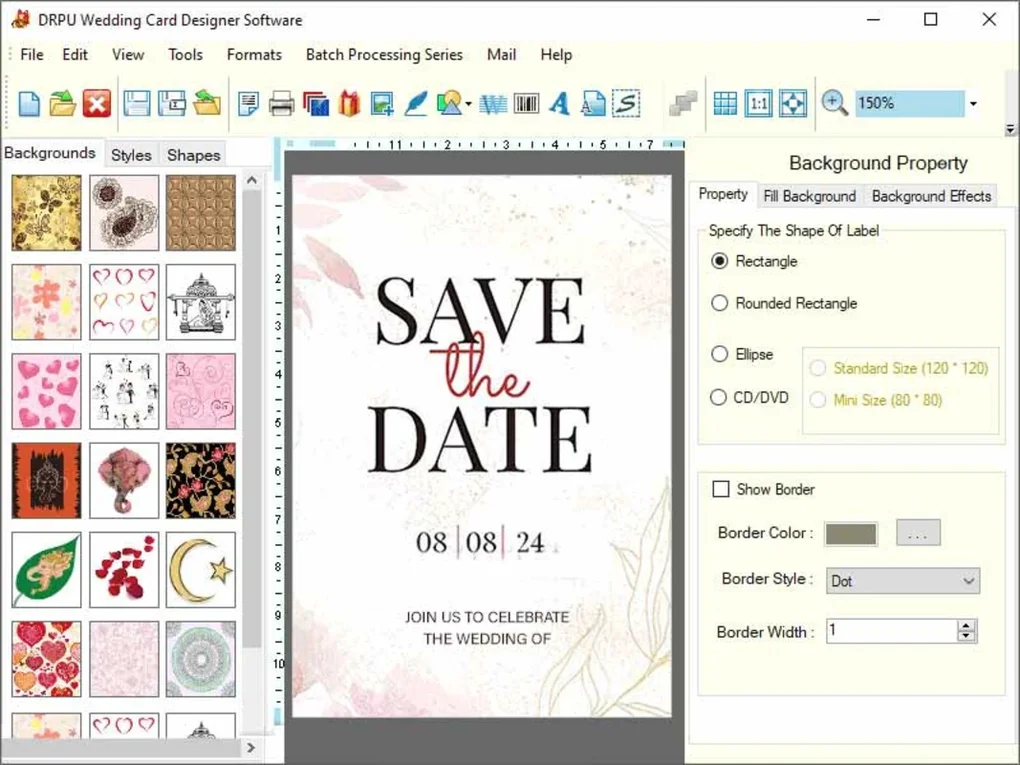
Upon opening, you’ll be greeted with a clean dashboard that guides you through the creation process. Start by selecting a template—either from the built-in library or by uploading your own design. You can then import your guest list using a CSV or Excel file. The software will automatically map each field (e.g., name, date, location) to the corresponding placeholder on the card.
Next, customize the design. Add your wedding photos, adjust fonts, change colors, and fine-tune layout elements. Use the drag-and-drop editor to reposition text boxes or images with precision. The real-time preview feature updates as you make changes, so you can see the impact instantly.
Once satisfied, use the “Generate Cards” button to create all cards at once. The software will process each entry and produce individual files. You can then choose to export all cards as a single ZIP folder or save them to a specific folder on your computer. For printing, simply open the PDFs or high-resolution images in your preferred software. The entire workflow—from data import to final export—can be completed in under 15 minutes, even for hundreds of cards.
Compatibility and System Requirements
Bulk Wedding Card Creating Software is designed exclusively for Windows operating systems. It supports Windows 7, 8, 8.1, and 10 (both 32-bit and 64-bit versions). The software is lightweight and runs smoothly on most modern Windows PCs, including laptops and desktops with basic specifications. Minimum system requirements include a 1 GHz processor, 512 MB RAM, and 100 MB of free disk space—making it accessible even on older machines.
While the software is currently only available for Windows, users on Mac or Linux can still use it via virtualization tools like Parallels or VMware, though this is not officially supported. For mobile users, there is no native Android or iOS app, but you can transfer your designs to a mobile device for viewing or sharing.
Regular updates are released by Free Barcode Software to fix bugs, improve performance, and add new features. These updates are delivered automatically through the software’s built-in updater, ensuring you always have the latest version. The company also provides a dedicated support forum and email assistance for users encountering issues.
Security is a top priority. The software is virus-free, with no ads or bundled toolbars. All downloads are verified through secure channels, and the installer is digitally signed for authenticity. You can trust that your personal data—especially sensitive information like guest names and contact details—remains private and protected.
Pros and Cons of Bulk Wedding Card Creating Software
Pros
- Free to download and use—no hidden costs or subscription fees
- Efficient bulk creation—generate hundreds of cards in minutes
- Template saving—maintain consistent design across all cards
- Supports CSV/Excel import—seamlessly integrate guest lists
- Multiple export formats—PDF, JPG, PNG for printing and sharing
- Lightweight and fast—runs smoothly on low-end Windows PCs
- User-friendly interface—ideal for beginners and non-designers
Cons
- Windows-only—no native support for Mac or Linux
- No mobile app—limited on-the-go access
- Basic design tools—not suitable for advanced graphic design
- No cloud integration—all files stored locally
- Minimal customer support—limited live help options
Frequently Asked Questions (FAQ)
Is Bulk Wedding Card Creating Software really free?
Yes, the software is completely free to download and use. There are no trial periods, subscription fees, or hidden charges. You can generate unlimited wedding cards without paying a single cent.
Can I use my own wedding photos in the cards?
Absolutely. The software supports common image formats like JPG, PNG, and BMP. You can easily drag and drop your photos into the design or use the built-in image library.
How do I import my guest list?
You can import your guest list using a CSV or Excel file. Simply map the columns (e.g., Name, Date, Location) to the corresponding fields in the software’s template editor.
Is the software secure?
Yes, the software is virus-free and does not contain ads or spyware. All downloads are secured through verified channels, and your data remains on your local device.
Can I update the software automatically?
Yes, the software includes an automatic updater that checks for new versions and installs them seamlessly in the background.
Conclusion and Call to Action
If you're planning a wedding or managing multiple events, Bulk Wedding Card Creating Software is a game-changer. It combines affordability, ease of use, and powerful functionality to help you design and produce wedding cards at scale. Whether you're a DIY bride, a busy planner, or a small business offering wedding services, this tool saves time, reduces errors, and ensures a polished final product.
With its intuitive interface, template system, and support for bulk data import, it’s one of the best free tools available for wedding card creation on Windows. While it lacks Mac and mobile support, its core features more than compensate for these limitations.
Download Bulk Wedding Card Creating Software today and take the stress out of wedding invitations. It’s free, secure, and ready to help you create beautiful, personalized cards for every guest. Don’t waste hours designing one by one—let this software do the work for you.
Guides & Tutorials
How to install Bulk Wedding Card Creating Software
- Click the Download button above.
- Once redirected, accept the terms and click Install.
- Wait for the Bulk Wedding Card Creating Software download to finish on your device.
How to use Bulk Wedding Card Creating Software
This software is primarily used for its core features described above. Open the app after installation to explore its capabilities.
User Reviews
No reviews yet. Be the first to share your experience.
You may also like
more
Llama 2
Free-to-use large language model As the new addition to Meta’s arsenal of langua...

NotebookLM
Revolutionizing the note-taking and idea-generation process NotebookLM is an exp...

Github co pilot
AI-inspired software development and coding platform GitHub Copilot is a browser...

Google Gemma
Google’s lightweight AI models Introducing Google Gemma , a family of cutting-ed...

AI Image Enlarger
A free app for Windows, by ai-image-larger. AI Image Enlarger is a free software...

DALL E
AI-driven text-to-image transformation engine DALL·E is a free graphic and desig...